Published Book on Amazon
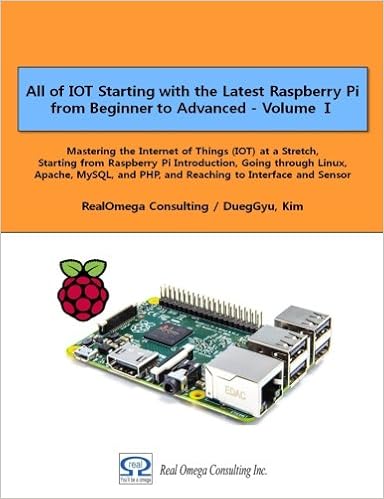 |
All of IOT Starting with the Latest Raspberry Pi from Beginner to Advanced – Volume 1 |
 |
All of IOT Starting with the Latest Raspberry Pi from Beginner to Advanced – Volume 2 |
출판된 한글판 도서
 |
최신 라즈베리파이(Raspberry Pi)로 시작하는 사물인터넷(IOT)의 모든 것 – 초보에서 고급까지 (상) |
 |
최신 라즈베리파이(Raspberry Pi)로 시작하는 사물인터넷(IOT)의 모든 것 – 초보에서 고급까지 (하) |
Original Book Contents
7.4 Detail Structure of Desktop Area
7.4.1 Features of Desktop
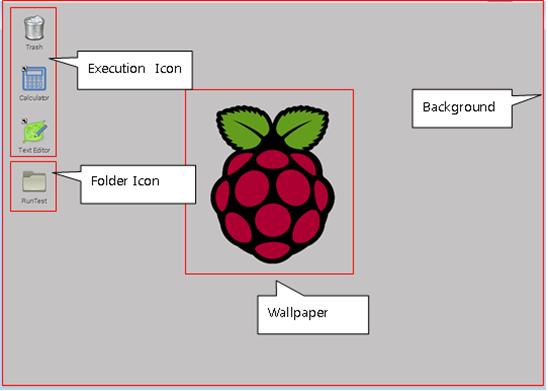
Figure 7‑13 Detail structure of the window desktop area
■ Execution icon
If you click the icon, the connected program will be executed automatically.
■ Folder
It means the folder created in the system. If you click the icon, [File Manager] is automatically executed and the data of the specified folder is displayed on the screen.
■ Background
It means all the basic space of desktop.
■ Wallpaper
It means a picture or photo that is specifically displayed on the screen. It can be placed in Background in various forms depending on the way it is expressed.
The following is a screen when a specific program is executed and a window displays.
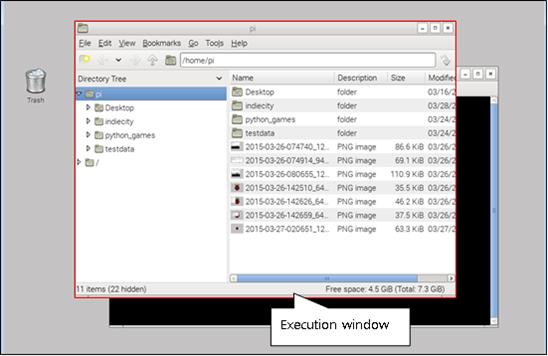
■ Execution window
When a specific program is executed, a window for indicating the program is displayed on the desktop.
■ Active window
It means the window which is the frontmost currently and means the window which can input with mouse or keyboard.
■ Inactive window
This means the window that is currently hidden behind and means the window that can input by the mouse or keyboard.